LINKO Update | Dark Mode Launch | Solving Glare in the Member Management Program
Hi there, this is LINKO 😊
Today, we’re here to share news about the LINKO Dark Mode update that so many of you have been waiting for.
It might look like a small feature, but once you start using it, you’ll probably think, “Why didn’t I use this sooner?” Especially if you’re running a gym.
Gyms are darker than you might think, right?
Think about gyms, Pilates studios, or GX rooms.
To create a great workout vibe, most gyms have their lighting set pretty low. Soft mood lighting, accent downlights... it helps with the interior feel and keeps people focused on their workouts.
But in that dark space, you’ve been looking at a bright white monitor all day long.
When handling member check-ins, confirming payments, or checking class schedules,
hasn’t the bright screen popped right into your eyes, making them sting and leaving you feeling drained after long use?
So we made this — LINKO Dark Mode
With this update, Dark Mode has officially launched in LINKO.
Dark Mode isn’t just about changing the background to black.
It noticeably reduces eye strain in low-light environments
Bye-bye glare from bright screens, making long hours of use way more comfortable
Information on the screen is easier to read even in dark spaces
You also get energy-saving benefits as a bonus (for OLED/AMOLED displays)
For people running systems all day in low-light spaces like gyms, Dark Mode isn’t just a design preference — it’s real-world convenience.
How to set it up (just 3 steps)
No worries. One minute is all you need.
① After accessing LINKO, go to the Settings menu
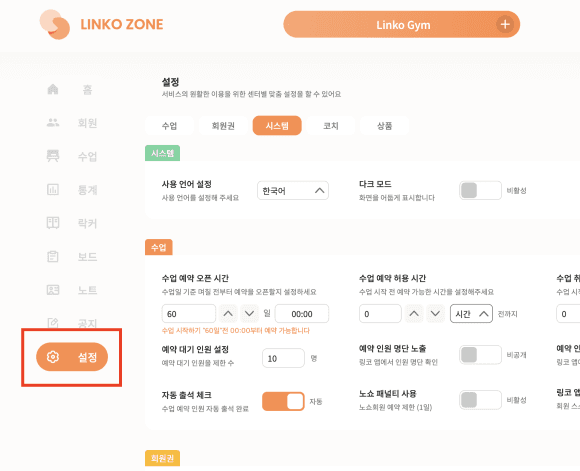
From the top or side menu, click [Settings].
② Enable Dark Mode in the System section
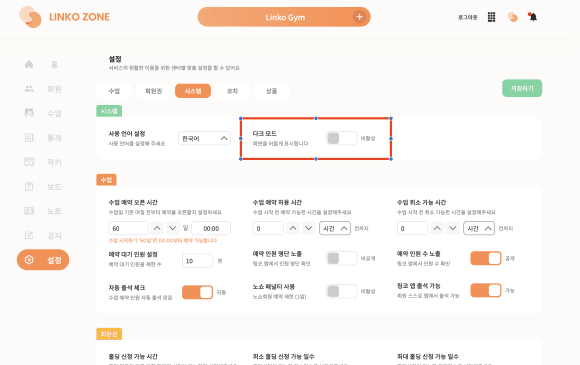
On the Settings screen, select the [System] tab and you’ll see the Dark Mode toggle. Turn it on to enable Dark Mode.
③ Click Save
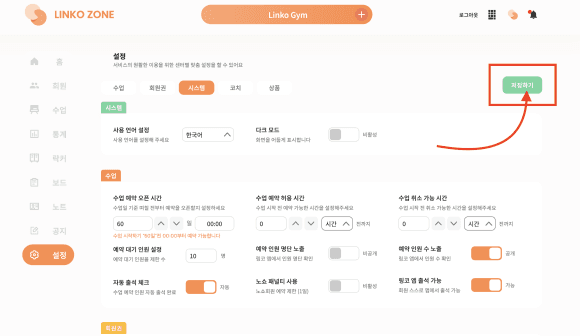
Finally, hit the [Save] button and you’re done!
The screen switches right away and Dark Mode is applied 🌙
Settings → System → Enable Dark Mode → Save
Especially recommended for these people
Gym owners operating in low-light environments
Front desk staff monitoring the LINKO screen all day
People whose eyes get tired easily or who are sensitive to light
Studios with a high volume of nighttime operations
Wrapping up
LINKO keeps getting updated to make gym operations easier and more convenient.
This Dark Mode update was also based on feedback from owners who actually use LINKO. We’ll keep adding the features that really matter on the ground, one by one.
Go ahead and turn on Dark Mode today 😊